Report Manager is a printable document generation engine. The resulting documents are usually based on database stored data, maybe printed, previewed or save to different file formats (Adobe PDF, HTML.). This task is commonly called by software developers as reporting.
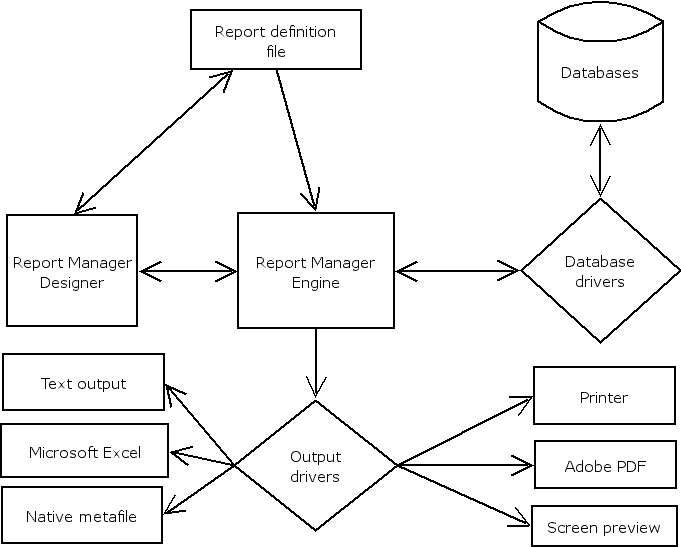
The engine take a report scheme (also called report definition) as input, connect and retrieve data from database/s (if necessary) and generate output document to printer or to different file formats.
This is a scheme of the process:
You can create and modify Report definition files with the Report Designer, the report files are processed by the engine connecting to databases, and a output driver is selected to generate output.
Currently Report Manager runs on Microsoft Windows 95/98/ME/NT/2000/XP/2003 operating systems and most Linux based systems (I386 based).
There is a Report Designer to define report schemes, this report schemes are usually stored in files, with .rep extension, but can be also stored inside databases (report library).
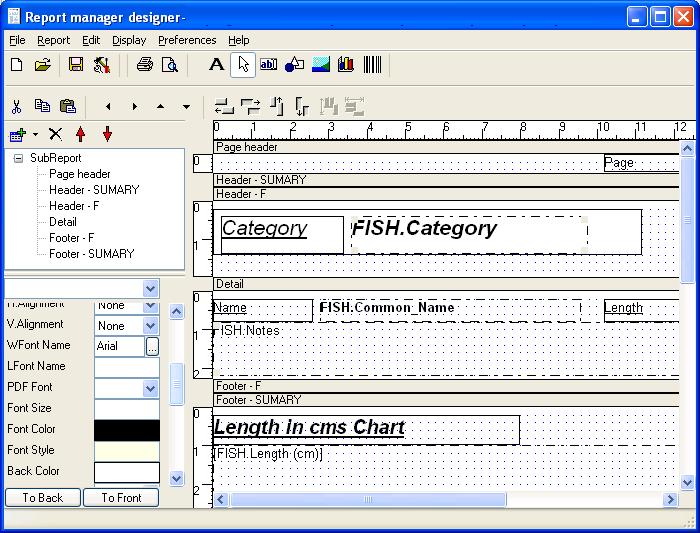
The report designer can execute (process) the report scheme to generate print out, preview and other output.
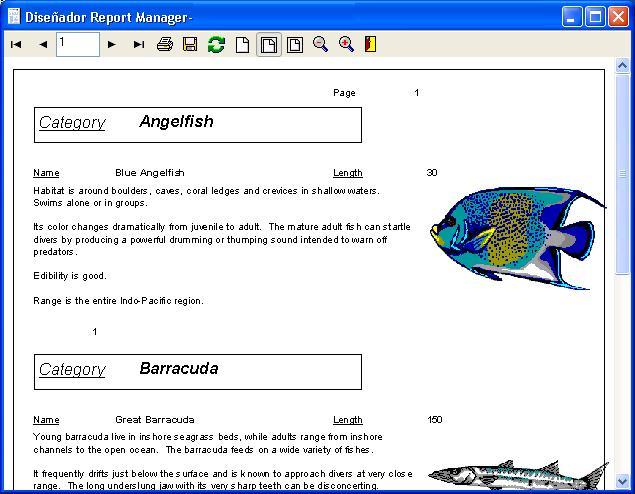
The output for a processed report can be the printer, the screen, an Adobe PDF file and others. There is a special output format, native to Report Manager engine, called report metafile, with .rpmf extension.
A report metafile is a file containing the information to print and preview the entire final document, it's like a PDF file but with a much simpler internal design, it's designed to be very small.
You can export to metafile from the preview window clicking the disk icon.
Report Manager includes a report metafile viewer, also advanced features like net report server use report metafiles in communication process. Metafiles are very useful to software developers.
Report Manager include software integration tools, so you can use the engine in a easy way from your own software applications.
An ActiveX control is provided for any tool that supports this technology.
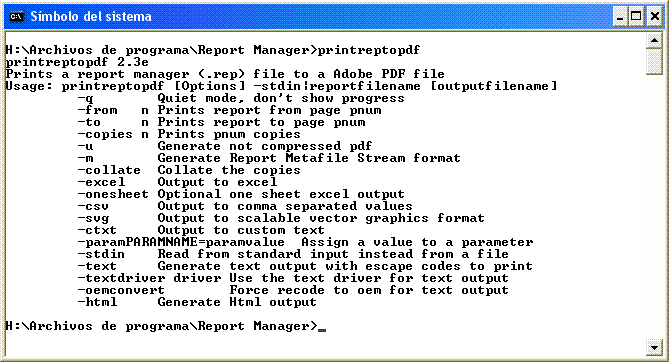
Command line tools and a shared library are also provided for external calls or to run batch processes.
For Borland Delphi/Builder/Kylix, native component installation can be used for better integration.

Report Manager include other advanced tools.
Net Report Server
Net Report server is a server application or Windows service that allow thin report client to browse and execute any report in the server, the only thing needed on the client computer is the report client (metaviewxp.exe).
Web Report Server
Web Report server is a standalone cgi application installable in any CGI compatible web server (Microsoft IIS, Apache...). By using a URL from a Internet browser, the report is executed and retrieved to the client computer with zero previous configuration on it.
Download and install Report Manager software to your computer. You can use the link http://reportman.es or install an already downloaded Report Manager installation wizard program.
Open Report Designer, open the sample provided: sample4.rep, and execute the report (preview on file menu). Take a look on the scheme and result, on preview test the disk icon to export the report to other formats.
Use notepad application to open the file sample4.rep, examine the file structure, it's not necessary you understand all the contents, just try to find elements you see in designer inside the file. Note that altering the file manually may convert the file on a non readable report scheme.
Open Report Manager designer again, open sample4.rep file, preview it and save the result as a metafile (.rpmf). Open Report Manager metafile viewer, and open the metafile you created. Inside metafile viewer application you can export the metafile to other formats.