Where does the Verifactu QR code go on the invoice, and how big is it?
· Toni Martir, arquitecto de software
Under the Verifactu regulation, Spanish companies that invoice with software must have it compliant before 1 January 2027, and the self-employed and everyone else covered, before 1 July. Every invoice that software produces carries a QR code that the recipient can use to check it against the Spanish Tax Agency. Whoever maintains the invoice template, the report that prints it, has to make room for it.
It goes at the top, preferably centred, measures 30 to 40 millimetres, and has the label «QR tributario:» (tax QR) above it, «VERI*FACTU» below it if the software sends its invoice records to the Agency, and at least 2 millimetres of white space around it. In the designer there is also a setting that is easy to miss: the error-correction level, which has to be M.
What the order sets
Order HAC/1177/2024 fills in article 6.5 of the invoicing regulation. Its article 21 sets the size, between 30 × 30 and 40 × 40 millimetres; the standard the code follows, ISO/IEC 18004; and the error-correction level, M. That level is the spare information that lets a reader restore the data if the code gets dirty or damaged. According to Denso Wave's QR code website, there are four levels, M is the one most often chosen, and a higher level makes the code bigger.
The QR code holds a URL with four pieces of the invoice: the issuer's tax ID (NIF), the series and number, the date and the total amount. The phrase «VERI*FACTU», or the longer «Factura verificable en la sede electrónica de la AEAT» (invoice verifiable on the Tax Agency's website), only goes on invoices from software that sends all its records to the Agency. And on an e-invoice, the kind that travels as data from one program to another, the URL in a separate field is enough.
The 2027 dates are those of the text in force in the Official Gazette; how they are set and who can move them I covered, in Spanish, in ¿Puede el Gobierno aplazar Verifactu en periodo electoral?
Where it goes and what goes with it
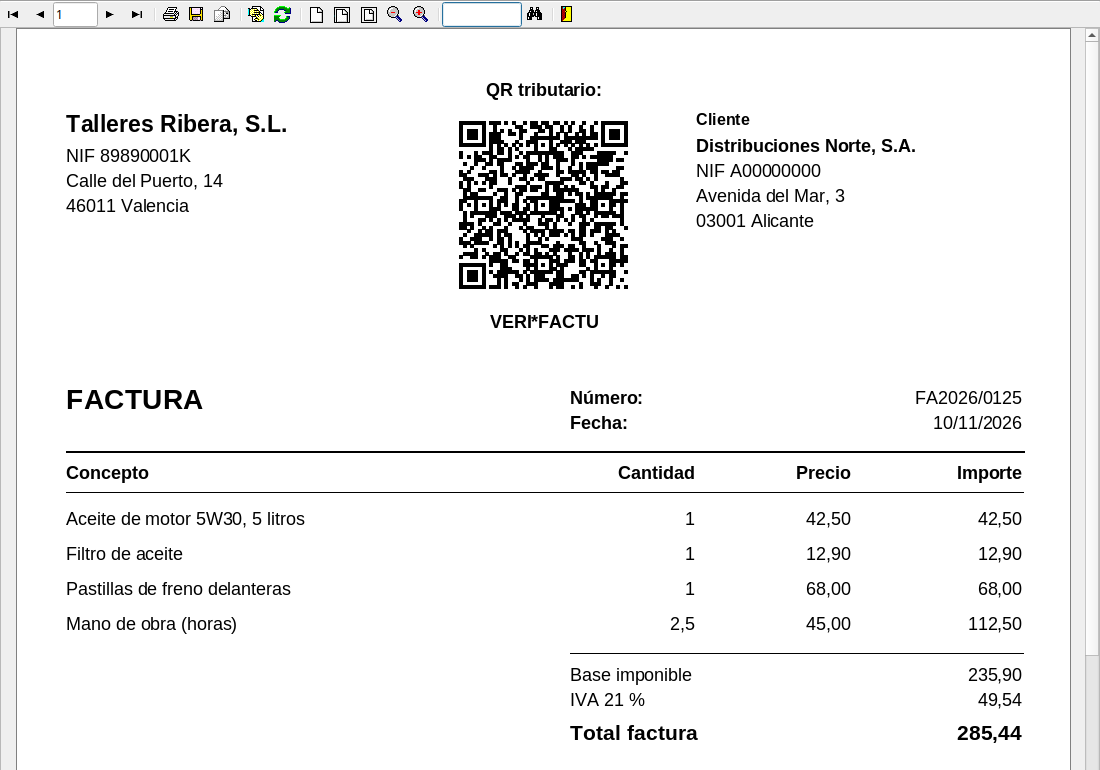
The Tax Agency spells out the rest in its QR technical document. The code goes at the start of the invoice, before its content, and only once, on page 1, even if the invoice runs to several. On a portrait invoice, at the top and preferably centred; on a landscape one, on the left. The label «QR tributario:» always goes above it and, where it applies, the VERI*FACTU phrase below, both in type the same size as the rest of the invoice or larger. At least 2 millimetres around it must stay blank, and the Agency recommends 6. In its A4 examples, the issuer's details, logo included, and the customer's can sit on either side of the code, as on the invoice in the image.
The URL inside it
The URL points to the Agency's checking service, at
www2.agenciatributaria.gob.es, and its path ends in ValidarQR if the software is
VERI*FACTU, or in ValidarQRNoVerifactu if it is not. It
takes four parameters: nif; numserie, the series and number, up to 60
characters; fecha, the date as day-month-year with hyphens; and importe, the
amount with a decimal point. The values are encoded as in any web address: the
Agency's example is an invoice number containing an &, which has to be written
%26.
That URL is generated by the invoicing software, which is the one that knows whether it issues as VERI*FACTU. The practical approach is for it to store the URL with the invoice and for the report simply to print it.
In the designer: the barcode component
This is how the invoice in the image is built in Report Manager. The code sits in the invoice's group header, which prints once per invoice, not in the page header, which would repeat on every sheet. The labels «QR tributario:» and «VERI*FACTU» are two centred labels above and below, bold and at 10 points, the same size as the data. The code itself is a barcode component with these properties:
The barcode properties for the tax QR code
Property names as the designer shows them in English. The position is for an A4 page with 1 cm margins: it centres a 4 cm box in the 19 cm of usable width.
Two of those properties hide a catch. The error-correction level is chosen in «ECC Level», called «PDF417 ECC» in earlier versions of the designer, and the value that gives level M depends on the engine that prints the report. With the Delphi and Lazarus engine, the one behind the Delphi and Lazarus designers, printreptopdf and the web report server, it is Level1; with the .NET engine, the one behind the .NET designer, the web designer and Reportman Server, it is Level3. With Auto, the default, both print the QR code at level L.
The other one is the size. The component keeps a white margin of four modules, the small squares the code is made of, inside its box. In the invoice PDF, made with the Delphi and Lazarus engine, with a 4 × 4 cm box, the code measures 33.3 millimetres and the margin almost 3 on each side, more than the 2 the Agency asks for. With a 3 × 3 cm box, the code shrinks to 25.4 millimetres, under the 30 minimum. At 4 cm it complies whether you measure the code alone or with its margin.
Check that it reads
Before signing off the template, read the code. I decoded the QR code in the
preview and the one in the PDF, and both return the exact URL, at level M. A
phone camera is enough: it has to show the URL with that invoice's tax ID,
number, date and amount. To test without using the production address, the
Agency has a test environment, at prewww2.aeat.es, which is what the example
invoice uses.
So where does it go, and how big is it?
At the top, preferably centred, only once, 30 to 40 millimetres and at level M, between «QR tributario:» and «VERI*FACTU», with at least 2 millimetres of white space. In the designer: QR type, the URL in the expression, a 4 × 4 cm box and, in «ECC Level», Level1 with the Delphi and Lazarus engine or Level3 with the .NET one. Recording and sending each invoice is the invoicing software's job: the template only prints the code.
Report Manager prints QR codes from a field or an expression (barcode component), and the invoice template is the same .rep file for the designer, printreptopdf, the web report server and Reportman Server, though level M takes a different value in each engine.
Sources
- Royal Decree 1007/2023, of 5 December, regulation on invoicing software, consolidated text (last update published on 3 December 2025): fourth final provision, «los obligados tributarios a que se refiere el artículo 3.1.a) deberán tener adaptados los sistemas informáticos a las características y requisitos establecidos en este reglamento y en su normativa de desarrollo antes del 1 de enero de 2027. El resto de obligados tributarios mencionados en el artículo 3.1 deberán tener operativos los citados sistemas informáticos antes del 1 de julio de 2027»; and article 3.1, «a) Los contribuyentes del Impuesto sobre Sociedades» (corporate tax payers) and «b) Los contribuyentes del Impuesto sobre la Renta de las Personas Físicas que desarrollen actividades económicas» (self-employed income tax payers), among others.
- Royal Decree 1619/2012, invoicing regulation, article 6.5: «a) La representación gráfica del contenido parcial de la factura mediante un código “QR”» and «b) Estas facturas, sean electrónicas o no, incorporarán además la frase “Factura verificable en la sede electrónica de la AEAT” o “VERI*FACTU” únicamente en aquellos casos en los que el sistema informático realice la remisión de todos los registros de facturación a la Agencia Estatal de Administración Tributaria».
- Order HAC/1177/2024, of 17 October: article 20.2, on an e-invoice «se deberá incluir como un campo independiente la “URL” contenida en el código “QR”, no siendo necesario incluir el propio código “QR”»; and article 21, «El código “QR” deberá tener un tamaño entre 30x30 y 40x40 milímetros y seguir las especificaciones de la norma ISO/IEC 18004. Para la generación del código “QR” se empleará el nivel M (medio) de corrección de errores», its content (issuer's tax ID, series and number, issue date and total amount) and «dependiendo de si el sistema informático que expide la factura y genera su correspondiente código “QR” es o no un sistema informático “VERI*FACTU”».
- Spanish Tax Agency,
Detalle de las especificaciones técnicas del código «QR» de la factura,
version 0.5.0 of 10 December 2025, linked from its
website.
Section 3: «se deben mantener como mínimo 2 milímetros de espacio vacío (en blanco) alrededor de
los cuatro lados del código “QR”, recomendándose que sean 6 milímetros», «se situará al principio
de la factura, antes de que empiece el contenido de ésta», «Si la factura ocupara varias páginas,
el código “QR” aparecería una única vez, en la primera página», in portrait «arriba de esta,
próximo al margen superior, preferiblemente centrado», in landscape «a la izquierda de esta», «un
texto que siempre deberá ir precediéndolo: “QR tributario:”», the VERI*FACTU phrase «justo
debajo del código “QR”» and both texts in type «siempre iguales o superiores a los del resto de
datos de la factura». Section 4: the parameters «deberán ser codificados de forma adecuada
siguiendo los estándares generales de las aplicaciones en entorno web (“URL encoding”) y
utilizando la codificación UTF-8», with the number «12345678&G33» written «12345678%26G33».
Section 5.1: the production URL, at
www2.agenciatributaria.gob.es, and the test one, at prewww2.aeat.es, both with the path
/wlpl/TIKE-CONT/ValidarQR; section 5.2, the same path ending inValidarQRNoVerifactu. Section 6:nifof 9 characters,numserieof «Máximo 60 caracteres»,fecha«DD-MM-AAAA» andimportewith «el “.” (punto) para separar la parte entera de la decimal». Annex, example i): on a portrait A4 page, using the spaces either side of the QR code for «datos referidos al emisor (incluido el logotipo) o al destinatario, se considera compatible con el código “QR” al principio de la factura». - Denso Wave, Error correction feature: «QR Code has error correction capability to restore data if the code is dirty or damaged. Four error correction levels are available for users to choose according to the operating environment. Raising this level improves error correction capability but also increases the amount of data QR Code size.» and «Typically, Level M (15%) is most frequently selected.»
- Report Manager: features, «barcodes (including QR)» and «The barcode is read from a expression or database field»; barcode component, type «QR 2D barcode, see ECC Level», «The value of the barcode is obtained evaluating this expression», and under «ECC Level», «Error correction level of the 2D barcodes, PDF417 and QR»: with the «Delphi and Lazarus engine (VCL and LCL designers, printreptopdf, repweb, ActiveX)», Level 1 is M; with the «.NET engine (.NET designer, web designer, Reportman Server)», Level 3 is M; in both, Auto is L; and «So a report printed by both engines gets the same QR only with L (Auto, Level 0, or Level 6 to 8); for M, Q or H choose the value of the engine that prints it.»; and Reportman Server, «The reports are the same .rep files the Delphi designer, printreptopdf and the Web Report Server read.»
- Own test, 10 November 2026: the invoice in the image, with made-up data in an SQLite database,
in the preview of the Report Manager 4.0.16 designer for Linux and as a PDF from printreptopdf
4.0.16. With the 4 × 4 cm box, the QR code in the PDF has 45 × 45 modules of 0.741 mm
(33.34 mm) and a margin of 4 modules (2.96 mm) on each side; with 3 × 3 cm, 25.40 mm. Read with
a decoder of my own, both with the Delphi and Lazarus engine: with error correction, called
«PDF417 ECC» in that version, at Level1, level M; at Auto, level L. The QR codes in the
preview and in the PDF both hold the
test-environment URL with
nif=89890001K,numserie=FA2026%2F0125,fecha=10-11-2026andimporte=285.44, with no errors in their correction blocks. The NIF 89890001K is the one in the Agency's examples.
Toni Martir, arquitecto de software · · sources checked on