Compiling in Delphi
Installation
Compiling Report Manager using Delphi
Download the components from SourceForge and unpack them to a directory:
https://sourceforge.net/projects/reportman
Report Manager ships ready-to-build packages for every Delphi / RAD Studio release. Pick the packages for your version from the tables below, listed newest first.
RAD Studio 10.3 Rio and later (recommended)
Modern releases use one project group per version, under the packages folder. Each group contains three packages:
- reportman_rtl – runtime, non-visual engine (reporting and PDF), with no IDE dependencies.
- reportman_vcl – runtime VCL components (requires reportman_rtl).
- reportman_designvcl – the design-time package you install into the IDE (requires reportman_rtl and reportman_vcl).
Open the project group for your version, build it, then right-click reportman_designvcl and choose Install:
| Version | Project group |
|---|---|
| RAD Studio 13 | packages\13.0\reportman.groupproj |
| RAD Studio 12 Athens | packages\12.0\reportman.groupproj |
| RAD Studio 11.2 Alexandria | packages\11.2\reportman.groupproj |
| RAD Studio 11 Alexandria | packages\11.0\reportman.groupproj |
| RAD Studio 10.4 Sydney | packages\10.4\reportman.groupproj |
| RAD Studio 10.3 Rio | packages\10.3\reportman.groupproj |
Legacy Delphi versions
Older versions install from the individual package files in the components root directory. Install them in the order shown; for the XE family install the runtime package first and then its design-time package.
| Version | Packages (install in this order) |
|---|---|
| Delphi 10.2 Tokyo | rppack_delxe10_2.dpk, then rppack_delxe10_2designtime.dpk |
| Delphi 10 Seattle | rppack_delxe10.dpk, then rppack_delxe10_designtime.dpk |
| Delphi XE7 | rppack_delxe7.dpk, then rppack_delxe7_designtime.dpk |
| Delphi XE4 | rppack_delxe4.dpk, then rppack_delxe4_designtime.dpk |
| Delphi XE3 | rppack_delxe3.dpk, then rppack_delxe3_designtime.dpk |
| Delphi XE2 | rppack_delxe2.dpk, then rppack_delxe2_designtime.dpk |
| Delphi 2009 | rppack_del2009.dpk (all in one) |
| Delphi 2007 | rppack_del2007.dpk (non-visual), rppackvcl_del2007.dpk (VCL), then rppackdesignvcl_del2007.dpk (designer) |
| Delphi 2005 | rppack_del2005.dpk (non-visual), rppackvcl_del2005.dpk (VCL), then rppackdesignvcl_del2005.dpk (designer) |
| Delphi 7 / 6 | rppack_del.dpk (non-visual), rppackvcl_del.dpk (VCL), rppackdesigntime_del.dpk (design editors), rppackdesignvcl_del.dpk (designer). The CLX packages rppackv_del.dpk and rppackdesign_del.dpk are legacy and optional. |
| Delphi 5 | rppack_del5.dpk (all in one, VCL only) |
| Delphi 4 | rppack_del4.dpk (all in one) |
Versions not listed above (for example XE5, XE6, XE8 or 10.1 Berlin) can usually be compiled by opening the package of the nearest version and letting the IDE upgrade it.
General notes
Before installing, remove the packages of any previous Report Manager version to avoid warnings. After a Delphi update, or after updating a related library (FireDAC, IBX, Indy…), rebuild and reinstall the packages in the same order.
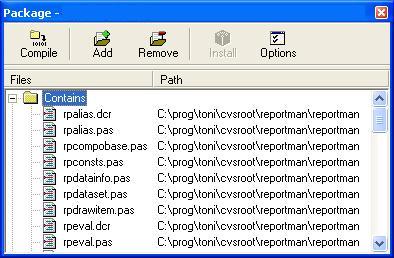
In the IDE choose File > Open, select the package (or the project group) files, click Build and then Install the design-time package, so you can preview reports without compiling your own application first.
You only need the packages your scenario requires: a console application needs only the runtime engine package; VCL applications also need the VCL package; to embed the designer in your own application install the designer package as well.
You can tailor the build through rpconf.inc: if you disable an option you can drop its dependency from the package requires clause (for example, remove the ADO dependency if you disable ADO support), or add support for another data layer such as Zeos.
To compile your own projects, add the Report Manager components directory to the IDE library path. If you build with runtime packages, ship the generated .bpl files with your application.
If you have problems, see the compilation options.