Linked queries
Advanced report design
Linked queries
A subreport has only one main dataset, but it can open as many datasets as you need, and each of them can be linked to the main dataset or to another dataset that is itself linked to the main dataset. You can also use the child subreport property of a section to merge subreports.
For example:
- A main dataset with a query to obtain the order lines and order header
- A customers dataset linked to the main dataset (customer number) to obtain the data for the customer
- A ship company dataset linked to the customer dataset by (ship company number)
To link a dataset to another one, open Data access configuration, select the linked (detail) dataset and choose the other one in its Master dataset property. The SQL of the linked dataset must use parameters, and each parameter must have the same name as a field of the master dataset: every time the master record changes, each parameter takes the value of the master field with its name and the linked query is opened again with the new values.
Here is a sample with two datasets, ORDERS and CUSTOMERS. ORDERS is the main dataset of the subreport, one record per order line:
SELECT FIRST 100 ITEMS.*,ORDERS.* FROM ORDERS
LEFT OUTER JOIN ITEMS
ON ITEMS.OrderNo=ORDERS.OrderNo
ORDER BY ORDERS.CustNo,ORDERS.OrderNo,PartNo
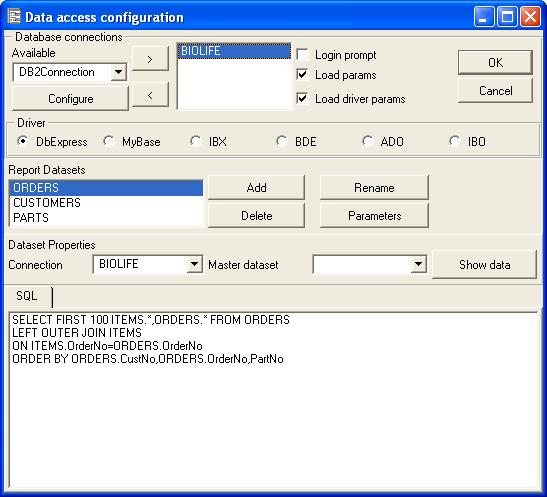
CUSTOMERS has Master dataset set to ORDERS, and its parameter
:CUSTNO is named after the CUSTNO field of ORDERS:
SELECT * FROM CUSTOMER WHERE CUSTNO=:CUSTNO
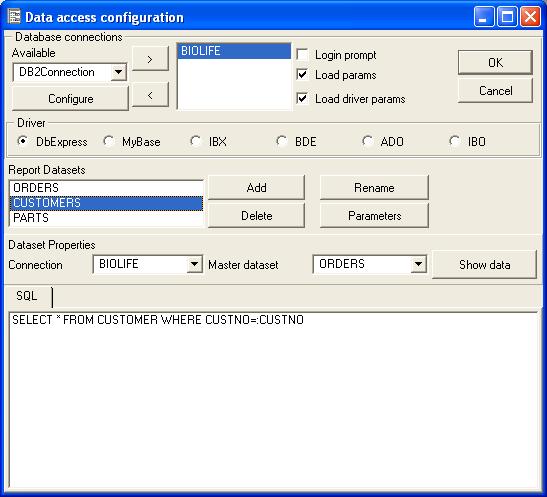
When you assign a main dataset to a subreport, the subreport prints its
details once for each record. So, while the subreport prints, every time the
CUSTNO field of ORDERS changes the CUSTOMERS query is opened again for the new
customer, and its fields are available to print the customer of the current
order line. In expressions, refer to each field through the alias of its
dataset, for example CUSTOMERS.COMPANY.
The parameter goes on the right of the comparison
(WHERE CUSTNO=:CUSTNO): some database drivers reject a parameter
on the left. See also report parameters.
Note: With the BDE driver (legacy) you can link Tables by selecting the correct IndexFields and Master Fields properties like you do in Delphi or Builder.