Expression evaluator
Advanced report design
Expression evaluator
The expression evaluator is a powerful tool included in Report Manager engine. It allows to evaluate complex expressions accessing dataset fields, convert field types, interact with the report to know the available free space in the current page, the current data group...
The Report Manager expression evaluator is like a scripting language but without iteration operators.
There are lot of report component properties that are expressions: print condition, skip page condition,...
To design advanced reports you should understand how the evaluator interacts with the engine:
- Before the print process, the expression evaluator is initialized, the engine add useful functions you can use: Page, Free_space, CurrentGroup...
- After the datasets of the report are open (this is done before print anything), the evaluator can access dataset fields with the syntax: ALIASNAME.FIELD (if the fields contain spaces use the clausors: [ALIASNAME.CITY NAME])
- Any component with a Identifier property assigned is also added to the evaluator name space, you can reference them using the syntax M.IDENTIFIER, or IDENTIFIER, also report parameters are included in the evaluator name space.
- The engine evaluates expressions in components in a natural way, that is Print Condition of a section is evaluated before printing this section, if a expression contains a reference to an Identifier (another report component), it will use the last value of the component value (last evaluated expression property)
- The exception of the rule are aggregate values, if you assign Aggregate property of a report component, the expression will be evaluated once for each record of the main dataset assigned to the subreport containing the report component, then the aggregate operation is done (sum, stddev...)
Evaluator syntax
The evaluator syntax is similar to pascal syntax, with a few exceptions:
- To create a variable assign a value to it: (newvariable:=0), but better if you create the variable adding a report parameter.
- All variables can be of any type, if an operator does not allow the combination of different types it will raise an exception (error), that is like using variant type in object pascal language or like basic language
- Sentence separator operator (;) has more precedence than assignment operator so you should use parentesis: (variable1:=2);(variable2:=4);
- Because the evaluator is expression based and not program based, when using the sentence separator, the result of the expression will be the last evaluated expression, for the sample above the result will be 4.
- It allows the use of the conditional IIF operator, that is use/evaluate one expression if the condition is true or other expression if false
- Variables are accessed as M.VARIABLENAME or VARIABLENAME, dataset fields
are accessed as ALIASNAME.FIELDNAME, or also FIELDNAME, but last syntax is
not recommended because can cause confusion with variable names, it's not
recommended to use an ALIAS with name 'M' .
Supported data types
| Data type | Description | Samples |
| Integer | Integer types, up to 64 bits of precision | 123 2345 -24345 0 |
| Double | Double precision types | 12.34 -12.34345 -1.3e-10 |
| Currency | Currency types, with a low range but without losing precision (four decimals allowed) | 12.4534 |
| String | String types (ansi), place two ' to represent one ' | 'Sample' 'It''s a sample' 'A sample with a line feed at end'+#10 |
| WideString | String types of multiple bytes, usually from fields, but also in expressions, the expression evaluator can work with WideStrings, but literals enclosed with ' sign can not contain WideStrig values, if you need a widestring literal use the format: 'this is the infinite widechar'+#8734 | ADATA.AWIDESTRINGFIELD |
| Boolean | Boolean data type | False True (A AND B) |
| TDatetime | Date and time datatype, this is a double precision number where each unit is a day, so 1/24 is an hour, you can operate as a double so you can sum days, hours... | Now-1/24 Date+30 |
| Null | Null value no value assigned | NULL |
| Binary | Although there is no operator support to binary values, you can evaluate fields to pass content to report components, for example images or large texts | ADATASET.ABINARYFIELD |
Evaluator operators
This table is ordered by operator precedence
| Operator | Type | Description |
| ( ) | Parenthesis | Expressions enclosed by parenthesis are always evaluated first. Parenthesis are also used to pass parameters to functions |
| IIF(condition,expr1,expr2) | Conditional | This is a special operator, if condition evaluates to true, the evaluates expr1 else evaluates expr2 |
| - + NOT | Unary | When this symbols operate to only one operator (NOT always does this) |
| * / | Arithmetic | Multiply and divide operators |
| + - | Arithmetic | Sum and Dif operators |
| >= <= > < | Comparison | Greater or equal, minor or equal, greater and minor. |
| <> >< | Comparison | The two operators have the same meaning: not equal |
| = == | Comparison | The two operators have the same meaning: equal |
| ; | Separator | Sentence or expression separator, the result will be the last evaluated expression |
| AND | Logical | The AND operator works with two boolean expressions |
| OR | Logical | The OR operator works with two boolean expressions |
| := | Assignment | This is the operator to assign values to variables, always place the variable in the left side |
Evaluator standard functions and constants
| Function or constant | Description | ||||||||||||||||
| True | Boolean constant | ||||||||||||||||
| False | Boolean constant | ||||||||||||||||
| Today | Returns the current date | ||||||||||||||||
| Time | Returns the current time | ||||||||||||||||
| Now | Returns the current date and time | ||||||||||||||||
| Null | Null value constant | ||||||||||||||||
| function EvalText (expr:string):variant | Evaluates a expression, you can have expressions inside database fields and evaluate them using this useful function | ||||||||||||||||
| function Uppercase (s:string) :string | Returns the string in upper case | ||||||||||||||||
| function Lowercase (s:string) :string | Returns the string in lower case | ||||||||||||||||
| function FloatToDateTime (n:Double):TDateTime | Converts a double value to a TDatetime value | ||||||||||||||||
| function Sin (ang:Double):double | Returns the sinus of the angle in radians | ||||||||||||||||
| function Round (num:double,r:double):double | Round the num number to r scale, so you can round to 5 cents assigning 0.05 to r parameter | ||||||||||||||||
| function Int (num:double):integer | Converts a double to an integer using the standard Int function, that is the smaller more closer integer value | ||||||||||||||||
| function Str (num:variant):string | Converts the parameter to string, the parameter can be any value that can be represented by a string (numbers, dates, times...) | ||||||||||||||||
| function Val (s:string):double | Converts a string to a number | ||||||||||||||||
| function Trim (s:string):string | Removes leading and trailing spaces from the string | ||||||||||||||||
| function Left (s:string; count:integer):string | Returns first count characters of the string, | ||||||||||||||||
| function Right (s:string; count:integer) :string | Returns the right part of a string | ||||||||||||||||
| function Substr(cadena:string; index:integer; count:integer) :string | Returns a substring beginning at index and copying count characters | ||||||||||||||||
| function Pos (substr:string,str:string):integer | Search a substring inside a string and returns the index where is found or 0 if not found | ||||||||||||||||
| function Sqrt (num:double):double | Returns the square root of the number | ||||||||||||||||
| function HourMinSec(h:Double; idenH:string; idenM:string; idenS:string) :string | Returns a formated string in format hh:mm:ss but separators are get from identifiers. Use the most flexible function FormatStr instead | ||||||||||||||||
| function Mod (d1:integer,d2:integer) :integer | Returns the module of the integer division | ||||||||||||||||
| function Monthname (d:datetime) :string | Returns the monthname of a date, you can use FormatStr also | ||||||||||||||||
| function Month (d:datetime) :integer | Returns the month number of a given date | ||||||||||||||||
| function Year (d:datetime) :integer | Returns the year of a given date | ||||||||||||||||
| function Day (d:datetime) :integer | Returns the day of a given date | ||||||||||||||||
| function Formatstr (format:string,v:variant):string | Powerful formating function, accepts all data types, and formats acording to the data type, for example for a DateTime value you can use the format string: 'dd/mm/yyyy hh:nn:ss', for a number: '###,###0.00', where the , says the use of thousand separator, the 0 are required format positions and # are not required format positions, this function is used in display format property for expressions | ||||||||||||||||
| FormatNum(mask:String; number:double) | Formats a number with a mask, this function is used in display format property for expressions. The mask is similar to the one used in FormatStr but allow the use of repeatable thousand separator and other options: A hidden decimal separator can be specified (indicates the position for the separation of integer and decimal part) as :, also you can include this pairs of chars indicating: LX Where X is the character used to fill needed numbers on the left, the default is 0 TX Where X is the character used as thousand separator. Some samples:
|
||||||||||||||||
| function NumToText (n:double,f:boolean):string | Returns the natural language representation of a number, f says if female words required (' una peseta'-'un euro'), for example for 1200 the result will be 'one thousand and two hundred'. The language is selected from the active report language. The implementation for this function is: English, Spanish, Catalan. | ||||||||||||||||
| function ReplaceStr(S,OldPattern, NewPattern:String):String | Search OldPattern inside S replacing it if found with NewPattern | ||||||||||||||||
| function FileExists (s:String):boolean | Return true if the file exists | ||||||||||||||||
| function ChtToChs (expr:string):String | Translates traditional Chinese to simplified Chinese (available only on Win32) | ||||||||||||||||
| function ChsToCht (expr:string):String | Translates simplified Chinese to traditional Chinese (available only on Win32) | ||||||||||||||||
| function IsInteger (avalue:string):boolean | Returns true if the string is a valid integer | ||||||||||||||||
| function IsNumeric (avalue:string):boolean | Returns true if the string is a valid number | ||||||||||||||||
| function IsValidDateTime(avalue:string):boolean | Returns true if the string is a valid date/time | ||||||||||||||||
| function CheckExpression(expression,message):boolean | If the expression is false raises an exception with the provided message | ||||||||||||||||
| function StringToBin:binary | Converts a string to a binary type. An expression returning a binary type can be used in the image expression for example. | ||||||||||||||||
| function Decode64(value:string):string | Decodes a base64 string to the original string representation, you can convert the result to binary if the original string represens an image for example. |
Evaluator functions and variables available while executing a report
| Function or constant | Description | ||||||||||||||||||||||||
| function GraphicClear (Gr:string):Boolean | Clears the values of a Chart report component, you can place this expression in beforeprint property of a section for example. The parameter is the identifier property of the Chart component | ||||||||||||||||||||||||
| function GraphicNew (Gr:string; V:Single; C:Boolean; Etiq:string; Caption:string) :Boolean | Inserts a new value in the Chart, the first parameter is the identifier of the Chart component. V is the value to insert, C says if there is a serie change, Etiq is the text of the value and Caption is the text of the serie | ||||||||||||||||||||||||
| function GraphicBounds (Gr:string; autol,autoh:boolean; low,high:double;log:boolean;
logbase:double; inverted:boolean):Boolean; |
Establish upper and lower bound for a chart, the axis can be inverted and also a logarithmic scale can be used. Set autol (automatic lower bound) to false and set a value to the low parameter, idem for autoh (automatic higher bound) | ||||||||||||||||||||||||
| function GraphicSerieColor(Gr:string, Color:Integer):Boolean; |
Set the current chart serie color | ||||||||||||||||||||||||
| function GraphicColor(Gr:string, Color:Integer):Boolean; |
Set the color for the last value added to the chart | ||||||||||||||||||||||||
| Identifier | Any identifier property assigned to a report component usually (TRpExpressions and TRpCharts) will create a variable in the expression evaluator, so you can calculate totals and then use the calculated value in other report components | ||||||||||||||||||||||||
| Page | Returns the physical page number | ||||||||||||||||||||||||
| PageNum | Returns the logical page number, you can alter this variable or initialize it setting Init.PageNum property in a group section | ||||||||||||||||||||||||
| Free_space , Free_space_inch, Free_space_cms | Returns the available space in the page, in twips (1440 twips = 1 inches), inches or centimeters | ||||||||||||||||||||||||
| function Eof (alias:string):Boolean | Returns true if the alias is at the end of the recordset | ||||||||||||||||||||||||
| Parameters | All the report parameters are available in the expression evaluator | ||||||||||||||||||||||||
| Draw functions | See draw functions page for details | ||||||||||||||||||||||||
| PAGECOUNT | This is a special expression, can not be combined or included inside another expression, when two pass report option is enabled, the engine will sustitute any PAGECOUNT expression with the integer page count value of the report, but you can still use the display format property to customize the final output. PAGECOUNT can not be used inside expressions because:
|
||||||||||||||||||||||||
| FREE_SPACE_TWIPS, FREE_SPACE_INCH, FREE_SPACE_CMS | Returns the available free space (vertical) in current page, in the selected unit. | ||||||||||||||||||||||||
| CURRENTGROUP | Returns the actual processing group, it returns 0 if the engine is printing details (so the next data section will be a detail), it returns a negative number if the engine is printing group headers (the number indicates what group header is processing) and a positive number when processing group footers. | ||||||||||||||||||||||||
| FIRSTSECTION | Returns true if evaluated inside the first non repeatable data section printed in the current page, that is if a page header or a group header with page repeat is printed they don't count for the first section printed. | ||||||||||||||||||||||||
PAGEHEIGHT, PAGEWIDTH |
Returns the page width and page height in twips ((1440 twips = 1 inches) | ||||||||||||||||||||||||
| function GetValueFromSQL (connectionname:String; sql:String):Variant |
This function uses the sql parameter to execute, and open a sql query using a connection name, it will return the first column value of the first row, or NULL if the opened dataset is empty. | ||||||||||||||||||||||||
| M.LANGUAGE | Allow the change of the report language at runtime | ||||||||||||||||||||||||
| PARAMINFO(paramname:string; index:integer) | Allow obtaining information about a report parameter, useful for multiple selection or list values
|
Building expressions
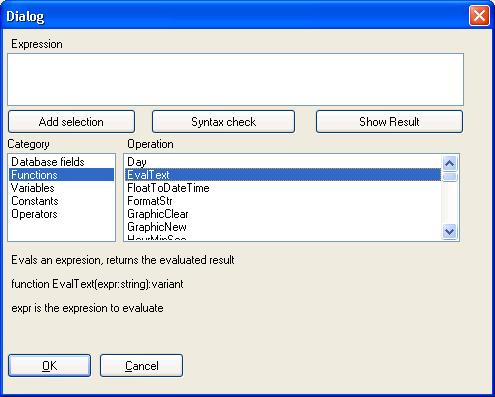
When you are editing a report, in the expression properties appears a button, clicking this button a expresion builder helper is shown.
There you can find information about available functions, variables and database fields, and you can syntax check expressions.
Using the expression evaluator in Delphi/Kylix/Builder
The report evaluator is included in components package. You can use it to evaluate expressions, functions, accessing to database fields etc..
All you need is to drop a TRpEvaluator component, the use is very simple:
procedure TForm1.Button1Click(Sender: TObject);

  begin

  RpEvaluator1.Expression:='2+2';

  RpEvaluator1.Evaluate;

  ShowMessage(String(RpEvaluator1.EvalResult));

  end;
If you need access to dataset fields drop a TRpAlias, edit the list to add a alias and assign a dataset to the alias, then assign the TRpAlias to the RpAlias property of TRpEvaluator, now you can include dataset fields in expressions as ALIAS.FIELDNAME.